10 Nov 2025
Rapid eLearning: A Guide to Faster Development & Tools (2026)
maestro
Author

Rapid eLearning: The Ultimate Guide to Faster Development & Tools (2026)
Traditional corporate training development, with its multi-month timelines and high costs, is a significant bottleneck. Business needs evolve quickly, but legacy development models fail to keep pace. By the time a comprehensive course is finally built and deployed, the procedures, products, or compliance rules it teaches are often already outdated. This lag creates critical knowledge gaps, inefficiencies, and risk.
Rapid e-learning is the strategic methodology designed to solve this problem. It delivers effective, high-quality training at the speed the business requires.
This guide provides a definitive answer to two key questions for L&D managers, instructional designers, and business leaders. First, what is the rapid elearning development process and how does it function in practice? Second, which specific rapid authoring tools are required to execute this methodology successfully?
What is Rapid eLearning Development?
Rapid e-learning development is a streamlined, agile methodology for creating and launching online training courses quickly. It stands in direct, intentional contrast to slower, traditional instructional design models.
The most common traditional model is ADDIE. ADDIE is an acronym for its 5 linear stages: Analysis, Design, Development, Implement, and Evaluate. This "waterfall" approach requires each stage to be fully completed and signed off before the next can begin. The result is a rigid, time-intensive process that can take 3-6 months to produce a single course.
Rapid e-learning replaces this linear model with an iterative one, similar to agile software development. The primary goal is to achieve "speed to competency." This methodology leverages two key assets to achieve this goal: the existing knowledge of in-house Subject Matter Experts (SMEs) and user-friendly rapid authoring tools.
The core principles of rapid e-learning are:
- SME Centrality: The Subject Matter Expert is no longer just a resource; they are a central partner in the development.
- Iterative Design: The course is built in rapid, testable cycles, not in one long push.
- Template-Based Development: Speed is achieved by using pre-built, high-quality course templates and interactions.
Instead of building every element from scratch, this approach focuses on assembling, customizing, and deploying effective content with maximum efficiency.

The Rapid eLearning Development Process Explained
The rapid e-learning development process is an agile, iterative workflow. It abandons the rigid, linear structure of traditional models in favor of a flexible, collaborative approach that prioritizes speed and immediate feedback.
The process has 4 distinct stages, which often overlap in a continuous cycle.
Stage 1: Leverage SMEs & Existing Content
The process begins by gathering content that already exists. This is a crucial time-saver. Instead of conducting a months-long "Analysis" phase, the instructional designer acts as a facilitator, curating existing materials.
There are 3 main sources for this content:
- Subject Matter Experts (SMEs): The designer interviews the in-house expert to extract the most critical, "must-know" information.
- Existing Documentation: This includes internal manuals, procedures, PowerPoint presentations, policy documents, and process flowcharts.
- Informal Assets: This includes webinar recordings, sales scripts, knowledge base articles, and even customer support ticket data, which reveals common knowledge gaps.
The designer's role is to identify the single learning objective and collate only the content that supports it, filtering out extraneous "nice-to-know" details.
Stage 2: Prototype with Templates
This stage is the key to achieving speed. Instead of an instructional designer spending 40 hours designing custom layouts in a graphics program, they use a rapid authoring tool. These tools have extensive libraries of pre-built, professional templates.
The designer (or SME) builds a functional prototype of the course in hours, not weeks. This prototype is not a series of static images; it is a working version of the final course.
Common templates used in this stage include:
- Interactive "Click-to-reveal" interactions
- Timeline and process-flow graphics
- Scenario-based questions
- Software simulations
- Video and quiz layouts
This allows all stakeholders to see and interact with the course immediately.
Stage 3: Iterate with Fast Review Cycles
The rigid "sign-off" gates of traditional design are eliminated. The SME and key stakeholders review the working prototype as it is being built. This agile review process is crucial.
This model avoids the common bottleneck where a course is "sent for review" and the designer receives a 20-page PDF of conflicting feedback two weeks later.
Fast review cycles happen in 2 ways:
- Collaborative Tooling: Modern, cloud-based rapid authoring tools allow SMEs to leave comments directly inside the module, much like in a Google Doc. The designer can see, resolve, and reply to feedback in real-time.
- "Over-the-Shoulder" Reviews: The designer and SME sit together (in-person or on a screen share) and walk through the prototype. This 30-minute meeting can accomplish what weeks of email-based reviews cannot.
This iterative loop of "build-review-refine" continues until the prototype is approved.
Stage 4: Deploy & Improve
Once the content is approved as "good enough" to meet the learning objective, it is deployed immediately to learners. The course is not considered "finished" but "launched."
This is a fundamental shift in mindset. The goal is not to launch a "perfect" course in six months, but to launch a "very good" course in one week.
After launch, learner feedback is collected. This data includes quiz scores, learner comments, and on-the-job performance data. This information feeds directly back into the development loop. The cloud-based nature of the tools means the designer can open the course, make a critical update in 10 minutes, and re-publish it instantly. This ensures the training content is never out of date.
What are the Best Rapid eLearning Tools?
Rapid e-learning tools, often called rapid authoring tools, are the technology that makes the process possible. These tools are characterized by their ease of use, robust template libraries, and cloud-based collaboration features. They are designed to empower instructional designers and, in many cases, non-technical SMEs to build professional, interactive courses.
The best tool depends on the specific use case. When evaluating a tool, organizations look at 4 key criteria: ease of use for SMEs, template library quality, collaboration features, and the quality of the responsive mobile output.
Compozer
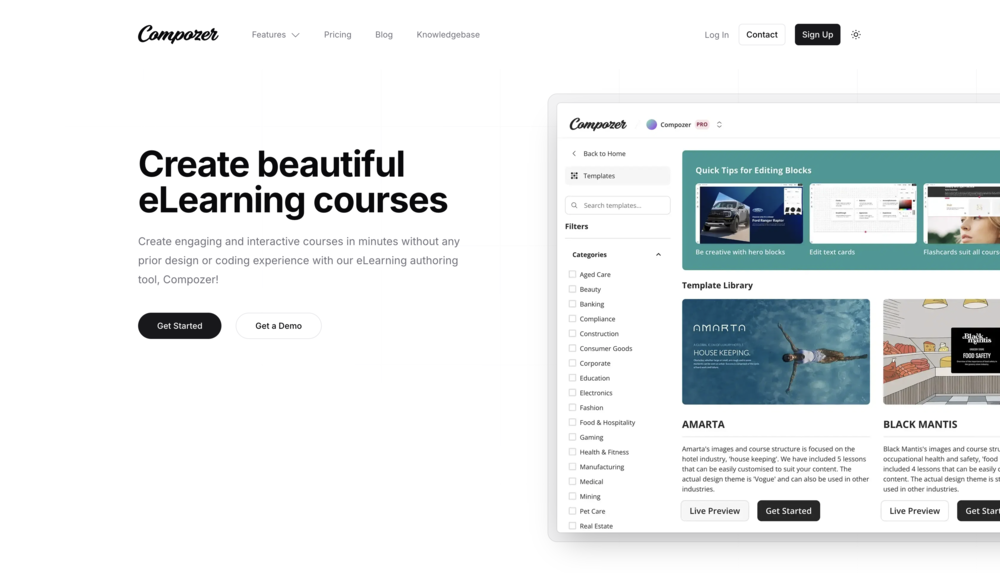
Compozer is an authoring platform built specifically for maximum efficiency in rapid e-learning. It focuses on a streamlined, template-driven workflow that allows L&D teams and SMEs to create and deploy fully responsive, mobile-first training at scale. Its design is centered on removing all technical barriers to enable true, collaborative rapid authoring.
How it Enables Speed: The platform is designed for team-based creation, allowing SMEs and designers to work in the same space. Its intuitive interface and powerful template system are optimized for building and deploying courses in minutes.
Best For: Organizations that need to empower their SMEs to create content directly and L&D teams that must manage a high volume of course creation and updates.
Limitation: As a specialized rapid tool, it does not focus on the complex, slide-based programming of legacy desktop software.
Articulate Rise 360
Articulate Rise is a fully web-based authoring tool and a market leader for rapid, responsive e-learning. Its key strength is its block-based design. Authors build beautiful, modern-feeling lessons by adding and customizing pre-made "blocks," such as text, interactive timelines, sorting activities, quizzes, and video.
How it Enables Speed: The block-based system is intuitive and requires zero technical skill. It is impossible to "break" the design, which guarantees a fully responsive, professional-looking course every time.
Best For: Creating beautiful, mobile-first courses quickly. It is a favorite for L&D teams and instructional designers who need to convert text-heavy content into an engaging web experience.
Limitation: It is less suited for creating complex, custom software simulations or highly intricate branching scenarios.
Vyond
Vyond is the leading tool for the rapid development of animated explainer videos. Animated video is a highly engaging format for microlearning and conceptual explainers, but it is traditionally slow and expensive to produce.
How it Enables Speed: Vyond's template library, pre-built scenes, and "drag-and-drop" character creator allow non-animators to produce professional-quality videos quickly.
Best For: Creating short (1-3 minute) explainer videos, marketing videos, and "how-to" guides that can be embedded into other e-learning courses.
Limitation: It is a video tool, not a complete e-learning authoring tool. It does not create SCORM packages or interactive quizzes on its own.
Articulate Storyline 360
Articulate Storyline is a powerful, desktop-based authoring tool. While often associated with more traditional development, it has many features that support rapid e-learning. It is the industry standard for creating complex, custom interactivity.
How it Enables Speed: Storyline has a large library of content templates, characters, and pre-built interactions. For experienced designers, it is a very fast tool for building custom software simulations and complex scenarios.
Best For: Creating complex branching scenarios, detailed software simulations, and courses that require custom variables and triggers.
Limitation: It has a steep learning curve and is not suitable for non-technical SMEs. Its responsive output is less fluid than "mobile-first" tools like Rise or Compozer.
What are the Business Benefits of a Rapid eLearning Strategy?
Adopting a rapid e-learning strategy provides direct, measurable benefits for the organization. This approach moves the L&D department from a slow-moving cost center to an agile, responsive performance partner.
There are 5 key business benefits:
- Reduced Development Time & Costs: This is the most significant benefit. Development time is cut from months to weeks, or even days. A course that once took 120 hours to develop using the ADDIE model can often be produced in 10-15 hours. This directly reduces the cost of labor, resources, and SME time.
- Faster Time-to-Competency for Employees: Employees get the training they need, when they need it. When a new product feature is launched, the sales team can be trained on it that same day, not next quarter. This is critical for new-hire onboarding, sales enablement, and performance support.
- Ability to Respond Quickly to Business Changes: When a new compliance rule is announced, a competitor launches a new product, or an internal process is updated, a rapid e-learning approach allows the organization to create and deploy response training immediately, ensuring the workforce is never out of sync.
- Empowers Subject Matter Experts (SMEs): User-friendly tools allow SMEs to create and update content themselves, bypassing the L&D bottleneck. This not only ensures the content is 100% accurate but also frees up L&D professionals to focus on more strategic tasks, such as curriculum planning and performance analysis.
- Easier to Maintain and Update Courses: Because the content is built in cloud-based tools and in small, modular chunks, it is simple to maintain. When a single step in a process changes, a designer can update that one module in 15 minutes and re-publish it, rather than re-building an entire monolithic course.

Frequently Asked Questions (FAQs)
What is the meaning of rapid learning?
Rapid learning, in a corporate context, refers to the rapid e-learning development process. Its meaning is centered on speed and efficiency. It is a methodology for shortening the time it takes to build and deploy training to employees, allowing the organization to meet an immediate business need.
What is rapid eLearning development?
Rapid e-learning development is a streamlined, agile methodology for creating training content. It contrasts with traditional, slower methods like ADDIE. It achieves speed by using agile review cycles, leveraging Subject Matter Experts (SMEs), and relying on template-based rapid authoring tools.
How to make a good eLearning course?
A good e-learning course is focused, relevant, and engaging. It starts with one clear, measurable learning objective. It uses interactive elements (such as clicks, scenarios, and quizzes) to keep the learner involved, not just passively reading. The content is directly applicable to the learner's job, and the design is "mobile-first," clean, and accessible.
What are the four stages of eLearning?
While traditional models like ADDIE have 5 stages, a more modern, agile approach (like rapid e-learning) can be simplified into 4 cyclical stages:
- Analyze & Curate: Identify the single objective and gather existing content/SME knowledge.
- Prototype: Use a rapid authoring tool's templates to build a functional version.
- Iterate: Get fast, in-context feedback from SMEs and stakeholders.
- Deploy: Launch the course and use learner data to make ongoing improvements.
What is the difference between rapid e-learning and microlearning?
These two concepts are closely related and work together.
- Microlearning refers to the output: a short, focused piece of content (e.g., a 3-minute video) that teaches one objective.
- Rapid E-learning refers to the process: the fast, agile methodology used to create that content.
You use a rapid e-learning process to create a microlearning module.
Can rapid e-learning work for complex topics?
Yes, but the approach is different. A complex topic (like "Leadership Skills") cannot be taught in one rapid-e-learning module. Instead, it is broken down into a curriculum of smaller modules. The rapid e-learning process is used to create each individual module (e.g., "How to Give Feedback," "Running an Effective Meeting") quickly and efficiently.